Support & Account Routing Boundaries: Triage & Intake Payloads
Classifying an incoming call is only the first step. Here is how B2B operations leads manage downstream routing boundaries, intake record payloads, and escalation protocols.
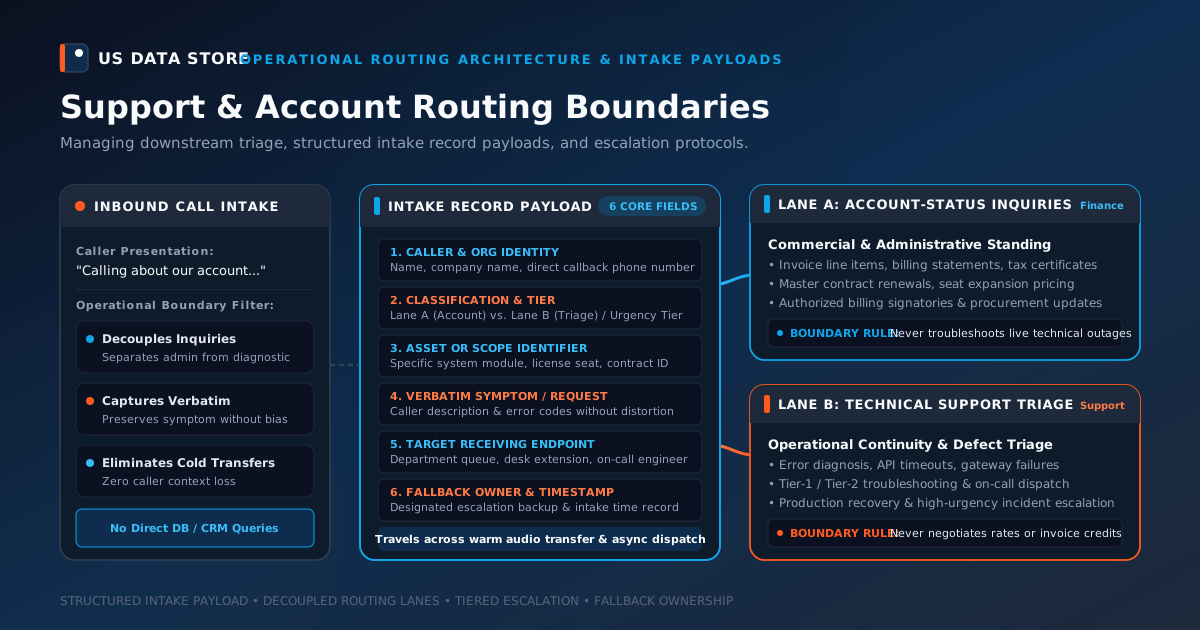
When an incoming B2B call connects, classifying whether the caller has an administrative account question or an active technical service request is essential. But front-line classification is only the first step. The real operational friction occurs immediately downstream: how the call crosses the boundary between departments, what structured information travels with the handoff, and who assumes ownership if the receiving desk is occupied.
In many mid-market B2B companies, downstream handoffs break down quickly. An account manager answers an incoming transfer only to find an agitated client describing server timeout errors that require terminal access. Conversely, a tier-2 support engineer is handed a call that turns out to be an accounts-payable inquiry regarding disputed sales tax on an annual subscription renewal. Even worse, callers are routinely subjected to “cold blind transfers,” forcing them to repeat company names, account identifiers, and complex error messages from scratch.
The direct answer is that a B2B operations or customer support lead manages the operational boundary between account-status inquiries and technical support triage by establishing three architectural controls: (1) an unambiguous operational routing boundary that strictly decouples administrative account checks from diagnostic technical workflows; (2) a standardized, minimal intake record payload that captures essential business context conversationally and carries it across the handoff; and (3) a tiered escalation protocol with designated fallback owners for critical outages or failed transfers. Crucially, this downstream architecture does not depend on unverified, direct database or CRM account-lookup integrations that risk leaking data or failing during network disruptions; it relies on disciplined intake questions and structured dispatch rules.
Establishing this operational boundary protects specialized engineering resources from administrative distraction, keeps commercial account managers focused on client relationships, and ensures callers experience a coherent, professional service path.
1. The operational boundary: Decoupling account status from technical triage
To prevent internal misdirection, an operations leader must define where administrative account stewardship ends and technical support triage begins. While both interactions touch the customer relationship, their objectives, operating rhythms, and required tooling are completely distinct.
Incoming B2B Call Intake
          │
          ▼
┌──────────────────────────────┐
│ Operational Boundary Filter  │
└──────────────┬───────────────┘
               │
       ─────────┴─────────
      │                   │
      ▼                   ▼
[Lane A: Account Status] [Lane B: Technical Triage]
  • Contract terms         • Error diagnosis
  • License allocations    • System availability
  • Statement review       • Workflow blockages
  • Authorized contacts    • Incident escalation
      │                   │
      ▼                   ▼
Commercial Account Desk   Technical Support Desk
Lane A: Account-Status Inquiries
An account-status inquiry deals with the contractual, commercial, or administrative standing of the customer relationship. The caller is typically looking at business documentation, managing vendor records, or planning corporate authorizations.
- Primary objective: Verify commercial standing, confirm subscription or contract terms, clarify billing statements, or update administrative authority.
- Core activities: Reviewing contract effective dates, explaining invoice line items, verifying licensed user seats, registering new authorized billing contacts, or discussing renewal timelines.
- Appropriate owners: Commercial Account Executives, Customer Success Managers, or Accounts Receivable Specialists.
- Operating boundary rule: Lane A personnel should never perform active software troubleshooting, diagnose system outages, or alter production configurations. If a billing question arises because an operational system failed, the operational failure must be routed to technical triage first.
Lane B: Technical Support Triage
Technical support triage focuses on system stability, operational continuity, performance degradation, and functional roadblocks. The caller is actively interacting with the product or service and is unable to complete their daily work.
- Primary objective: Restore operational functionality, diagnose defect root causes, isolate service interruptions, or guide users through technical configuration.
- Core activities: Reproducing software errors, analyzing diagnostic error codes, inspecting system logs, triaging field equipment faults, or dispatching on-call engineering specialists.
- Appropriate owners: Tier 1 / Tier 2 Technical Support Desks, Network Operations Engineers, or Field Service Dispatchers.
- Operating boundary rule: Lane B personnel should never negotiate contract rates, interpret legal liability clauses, or promise invoice credits during a technical troubleshooting call. Diagnostic specialists must focus exclusively on technical recovery, capturing any commercial grievances strictly as supporting background for account owners.
The cost of “boundary bleed”
When operations teams fail to enforce this boundary, two destructive patterns emerge:
- Engineering overhead: Highly compensated technical engineers spend hours explaining pro-rated invoice adjustments, diluting engineering throughput and lengthening technical resolution queues.
- Commercial overpromising: Commercial account managers attempt ad-hoc technical troubleshooting without engineering visibility, giving callers inaccurate technical advice or setting unachievable recovery expectations.
Enforcing a clean boundary ensures each inquiry reaches the professional equipped to resolve it.
2. The intake record payload: What context must travel across the handoff
The greatest source of customer dissatisfaction during a B2B handoff is information loss. When a caller is transferred to a specialist who asks, “Can you start from the beginning and tell me your company name and what’s going on?”, the business appears disorganized and indifferent.
To bridge the gap between intake and execution, operations leaders must define a standardized intake record payload. An intake payload is the minimal, structured packet of operational context collected during the initial conversation that travels directly to the receiving desk.
The 6 essential fields of an intake payload
A robust B2B intake payload should contain exactly six standardized fields:
| Field Name | Operational Definition | Purpose for Receiving Specialist |
|---|---|---|
| 1. Caller & Organization Identity | Caller full name, direct callback phone number, company name, and stated caller role. | Eliminates basic re-verification; enables immediate callback if audio disconnects. |
| 2. Inquiry Classification & Tier | Lane assignment (Account-Status vs. Technical Triage) and stated operational priority (Standard, Degraded, or Critical Outage). |
Dictates the routing queue and alerts the receiving desk to urgent operational stakes. |
| 3. Asset or Scope Identifier | Specific system, software module, license tier, equipment serial number, or contract reference stated by caller. | Gives the specialist the precise subject matter to pull up before picking up the call. |
| 4. Verbatim Symptom / Request | Caller’s exact description of the issue, error codes, or administrative question, recorded without subjective filtering. | Prevents misunderstanding or game-of-telephone distortions across internal handoffs. |
| 5. Target Receiving Endpoint | Designated departmental queue, specific desk extension, or on-call engineer endpoint. | Establishes the primary recipient responsible for the conversation. |
| 6. Fallback Owner & Timestamp | Designated backup team or escalation manager, accompanied by the call intake timestamp. | Ensures accountability if the primary endpoint is busy or unable to answer. |
An illustrative intake payload schema
In practice, this context can be formatted as a concise, structured operational card delivered alongside a warm transfer or dispatched to an internal queue:
[B2B INTAKE RECORD PAYLOAD]
TIMESTAMP: 2026-10-12T09:14:22 CST
CALLER: Marcus Vance, VP Operations
COMPANY: Apex Logistics Network
CALLBACK: (555) 019-8432
CLASSIFICATION: Technical Support Triage
PRIORITY: Severity-1 (Production Interrupted)
ASSET / SCOPE: EDI Gateway / API Ingest Cluster #3
VERBATIM: "API returning 504 gateway timeout on all freight manifests since 08:45. 14 trucks waiting at gate."
TARGET ENDPOINT: On-Call Support Desk (Ext. 402)
FALLBACK OWNER: Operations Escalation Lead (Ext. 410)
Why lean payloads outperform bloated intake forms
Operations leaders often make the mistake of attempting to collect exhaustive diagnostic data during the initial phone intake—asking callers for browser versions, network trace routes, or full corporate billing histories.
This approach frustrates callers and increases handle time without improving resolution rates. The purpose of phone intake is not to solve the technical issue or audit the contract; its purpose is to establish sufficient structured context to connect the caller to the right specialist on the first attempt. Keep the intake payload lean, verifiable, and actionable.
3. Blank illustrative account and support routing boundary worksheet
To help B2B operations and support leaders audit and implement their own routing architecture, the following blank worksheet provides a reusable framework. Operations leads can use this template to map standard call scenarios, assign operational classifications, define required payload fields, and establish primary endpoints and fallback owners.
Account and Support Routing Boundary Worksheet
| Call Scenario / Request Type | Operational Classification | Minimum Intake Payload Required | Primary Receiving Desk & Endpoint | Handoff Mode (Warm Transfer vs. Async Dispatch) | Escalation Trigger & Fallback Owner |
|---|---|---|---|---|---|
| Contract Term / Renewal Milestone Inquiry | Account-Status Inquiry | Caller Name, Company, Contract/MSA ID, Renewal Date, Key Question | Assigned Account Executive / Customer Success Desk | Warm transfer during business hours; asynchronous dispatch after hours | Escalate to Director of Sales if renewal window is <30 days; Fallback: General Account Queue |
| Invoice Line-Item or Statement Clarification | Account-Status Inquiry | Caller Name, Company, Invoice Number, Disputed Amount, Statement Date | Accounts Receivable / Billing Operations Desk | Asynchronous dispatch with structured payload confirmation | Escalate to Billing Manager if withholding payment; Fallback: Finance Team Shared Desk |
| Authorized Contact or Administrative Role Update | Account-Status Inquiry | Requesting Authority, Company Name, Contact Name/Email to Add or Remove | Customer Success / Account Operations Desk | Asynchronous dispatch; requires documented audit verification | Escalate to Security/Compliance Lead if unauthorized request suspected; Fallback: Operations Lead |
| Routine Configuration or User Guidance | Technical Support Triage | Caller Name, Company, Product Module, Specific Workflow in Question | Tier-1 Technical Support Desk | Warm transfer if specialist available; asynchronous dispatch if queue > 5 min | Escalate to Tier-2 Support if workflow blocks daily tasks; Fallback: Senior Support Specialist |
| Standard Defect / Non-Critical Bug Report | Technical Support Triage | Caller Name, Company, Feature Affected, Error Message, Workaround Status | Tier-1 / Tier-2 Support Engineering Queue | Asynchronous dispatch with structured reproduction context | Escalate to Product Operations if impacting multiple users; Fallback: Support Desk Lead |
| Critical System Outage / Production Halt | Technical Support Triage (High Priority) | Caller Name, Company, Offline Asset/Cluster, Business Impact, Error Code | On-Call Technical Incident Desk | Immediate warm audio transfer with verbal payload briefing | Immediate escalation to Incident Response Manager if unacknowledged in 3 min; Fallback: VP Operations |
| Hybrid: Disputed Billing Tied to Ongoing Technical Failure | Cross-Boundary Escalation (Triage Priority) | Caller Name, Company, Affected System, Disputed Invoice #, Operational Status | Technical Support Desk (Primary) + Account Executive (Flagged Copy) | Immediate warm transfer to Technical Desk; async notification to Account Owner | Escalate to Customer Operations Lead; Fallback: Designated Operational Escalation Manager |
| [Custom Team Scenario 1] | [Account Status / Technical Triage] | [Define minimum required fields] | [Define department & endpoint] | [Warm Transfer / Async Dispatch] | [Define escalation trigger & fallback] |
| [Custom Team Scenario 2] | [Account Status / Technical Triage] | [Define minimum required fields] | [Define department & endpoint] | [Warm Transfer / Async Dispatch] | [Define escalation trigger & fallback] |
(Operational note: This worksheet is a buyer-side operational planning aid designed to help internal teams map their own inbound policies. US Data Store provides structured conversational answering, context capture, and configurable call routing based on your business rules; it does not perform automated database lookup, live CRM record extraction, automated ticket system modifications, or contractual SLA enforcement.)
4. Defining escalation protocols and support handoffs
A routing boundary is only as resilient as its escalation and handoff mechanics. When a call cannot be resolved at the primary desk, or when an emergency exceeds standard intake parameters, the system must follow a pre-defined escalation path rather than improvising.
Warm audio transfers vs. structured asynchronous dispatch
Operations teams should establish two distinct handoff modes based on caller urgency and operational capacity:
- Warm Audio Transfer (Live Hand-off):
- When to use: High-severity technical incidents, production interruptions, or high-value executive account discussions during business hours.
- Mechanism: The intake agent places the caller on brief hold, dials the receiving specialist endpoint, verbally briefs the specialist using the intake payload, and bridges the audio connection.
- Benefit: The specialist enters the conversation fully briefed; the caller experiences zero repetition.
- Structured Asynchronous Dispatch (Queue Delivery):
- When to use: Routine account-status reviews, non-urgent configuration questions, bug reports with existing workarounds, or after-hours inquiries.
- Mechanism: The intake agent captures the complete intake payload, provides the caller with a clear expectation of the next step, and dispatches the record to the receiving team’s verified inbox or queue.
- Benefit: Protects engineering and account teams from constant phone interruption while capturing clean, actionable records for prioritized follow-up.
Severity-based escalation triggers
To prevent operational bottlenecks, establish explicit escalation triggers:
[Inbound Intake]
       │
       ├─► Severity 3: Routine / Administrative ────► Asynchronous Dispatch
       │
       ├─► Severity 2: Degraded / Impaired ────────► Warm Transfer (Queue Fallback)
       │
       └─► Severity 1: Critical Outage / Halt ─────► Immediate Warm Transfer
                                                            │
                                                  (Unanswered after 3 min)
                                                            │
                                                            ▼
On-Call Incident Lead- Severity 1 (Critical Outage / Revenue-Halting): If a caller reports that core systems are completely inaccessible or production is halted, standard queues are bypassed. Intake immediately initiates a warm transfer to the on-call incident desk. If the endpoint is unacknowledged within 180 seconds, the call automatically rolls over to the secondary incident commander.
- Severity 2 (Degraded Operations / Core Feature Impaired): Callers experiencing significant operational friction without complete work stoppage are routed to Tier-2 support queues with an attached high-priority payload.
- Severity 3 (Standard Inquiries & Administrative Checks): Handled via standard departmental queues or asynchronous payload delivery during regular business hours.
The “failed handoff” protocol: Eliminating dropped callers
One of the most damaging failures in B2B call handling is the failed transfer—where an intake agent attempts to transfer a caller to a busy desk, the line rings indefinitely, and the call is disconnected.
A reliable escalation architecture must include an explicit failed handoff protocol:
- Never drop to voicemail without notice: If a destination endpoint does not answer after three rings (or 15 seconds), the intake agent retrieves the caller from hold.
- Transparent explanation: The intake agent explains the situation honestly: “Our technical lead on that cluster is currently assisting another team with an active case. I have documented your error code and callback number.”
- Guaranteed fallback assignment: The intake payload is routed to a designated daytime fallback owner who is accountable for logging the record and initiating an informed callback.
5. An illustrative scenario: Managing routing boundaries at Meridian Cloud Logistics
The following scenario illustrates how a mid-size B2B freight software and logistics platform organizes its inbound phone boundaries between account status and technical support triage. It is provided strictly for operational planning illustration and does not represent an actual customer, live transcript, or guaranteed business outcome.
Meridian Cloud Logistics provides enterprise warehouse management software and freight telemetry systems to regional 3PL logistics hubs across North America. During morning distribution peaks (07:00–10:00), Meridian handles heavy call volume spanning billing disputes, routine license provisioning, and emergency warehouse gateway stoppages.
Previously, Meridian used an unguided phone menu with options like “Press 1 for Support, Press 2 for Account Care.” Callers frequently guessed, resulting in chaotic misroutes: tier-3 database engineers spent mornings looking up uncredited invoice payments, while commercial sales reps received frantic calls about disconnected forklift scanner terminals.
To bring order to their operations, Meridian implemented clear routing boundaries, a standardized intake record payload, and tiered escalation protocols.
Test Call 1: The Downstream Account-Status Routing
- Caller: Teresa Morales, Corporate Controller at a 4-facility 3PL warehouse group.
- Initial statement: “We are onboarding twenty new warehouse shifts next Monday and I need to verify our current seat allocation and ensure the additional licenses won’t disrupt our contracted billing rate.”
- Boundary assessment: The caller is a corporate controller inquiring about license tiers, contract pricing schedules, and administrative user allocations. There is no active system failure.
- Intake payload captured:
- Caller / Org: Teresa Morales, Controller, Trans-State Logistics.
- Classification: Account-Status Inquiry (Lane A).
- Priority: Standard (Severity 3).
- Scope: WMS Enterprise Licensing Schedule / 20 Additional Seats.
- Verbatim: “Needs to confirm tier expansion pricing for 20 seasonal seats before Monday onboarding.”
- Destination Endpoint: Commercial Customer Success Desk (Ext. 204).
- Action taken: Because this was an administrative inquiry during standard hours, the intake agent performed an asynchronous payload dispatch to the assigned Customer Success Manager, providing the caller with confirmation that their account manager would follow up with the exact rate amendment schedule.
- Result: The account manager reviewed the master contract, prepared the seasonal amendment document, and contacted Teresa with a ready-to-sign agreement within two hours. Engineering was never disturbed.
Test Call 2: The High-Severity Technical Triage & Warm Transfer
- Caller: Derek Chen, Morning Operations Supervisor at a cross-dock freight terminal.
- Initial statement: “Our EDI ingest gateway just dropped offline. None of our inbound truck manifests are downloading, and we have forty freight drivers lined up outside the terminal gate right now.”
- Boundary assessment: The caller is an operational supervisor experiencing an active, revenue-halting system disruption. This is a critical technical support emergency.
- Intake payload captured:
- Caller / Org: Derek Chen, Operations Supervisor, Metro Cross-Dock Terminal.
- Classification: Technical Support Triage (Lane B).
- Priority: Critical Outage (Severity 1).
- Scope: EDI Gateway Cluster B / Manifest Download Service.
- Verbatim: “EDI gateway dropped offline at 07:12. Inbound truck manifests failing to download; 40 trucks queued at gate.”
- Destination Endpoint: On-Call Technical Incident Desk (Ext. 401).
- Action taken: The intake agent immediately flagged the call as Severity 1, placed Derek on brief hold, and initiated a warm audio transfer to the on-call incident desk. The intake agent briefed the incident engineer using the structured payload.
- Result: The incident engineer picked up the line already knowing the affected cluster and operational urgency. Within four minutes of connecting, the engineer identified a stalled ingest daemon, restarted the gateway cluster, and confirmed that manifest queues were processing. Derek avoided an extended terminal gridlock without having to repeat a single detail.
Test Call 3: The Cross-Boundary Escalation (Blended Dispute)
- Caller: Evelyn Wright, VP of Distribution at an omnichannel retail hub.
- Initial statement: “Your software has had latency issues all week, our pickers are falling behind schedule, and I’m looking at our latest invoice and refusing to authorize payment until someone fixes this and credits our account.”
- Boundary assessment: The call blends a technical performance degradation (picker terminal latency) with a serious commercial dispute (withheld payment and credit demand).
- Intake payload captured:
- Caller / Org: Evelyn Wright, VP Distribution, Vantage Retail Logistics.
- Classification: Cross-Boundary Escalation (Technical Triage Priority).
- Priority: Degraded Operations / High-Value Commercial Dispute (Severity 2).
- Scope: Picking Terminal RF Module Latency / Invoice #9842.
- Verbatim: “Caller reports 3-5 second scan latency on picking RF units impacting shift output; withholding payment on invoice #9842 pending resolution and credit.”
- Destination Endpoint: Technical Support Lead (Primary) + Account Executive (Flagged Copy).
- Action taken: The intake agent applied the operational continuity rule: operational stabilization comes first. The agent initiated a warm transfer to the Senior Technical Support Lead to diagnose the latency issue, while simultaneously routing a flagged copy of the intake payload to the assigned Enterprise Account Executive.
- Result: The technical lead resolved the latency problem by updating an index on the warehouse database. Concurrently, the account executive contacted Evelyn with full knowledge that the technical issue had been resolved, enabling a productive discussion regarding service quality and commercial renewal.
6. Operating boundaries and honest technical capabilities
When designing an inbound call routing architecture, operations leaders must maintain clear, honest expectations about what inbound phone systems can and cannot automate. Overpromising technical capabilities creates operational vulnerabilities.
What inbound phone automation does well
- 24/7 inbound voice answering: Providing an immediate, business-professional first response to every incoming call without busy signals or dropped lines.
- Conversational context collection: Asking disciplined, business-defined triage questions to capture caller identity, affected assets, stated urgency, and verbatim problem descriptions.
- Structured payload generation: Assembling captured context into a standardized operational card and delivering it alongside transfers or internal notifications.
- Configurable team routing & warm handoffs: Directing callers toward the appropriate departmental extension or on-call engineer based on agreed operational boundaries.
- Visible exception handling: Escalating complex, unclassifiable, or critical outage calls to designated human fallback owners.
Strict technical operating boundaries
To ensure operational integrity, operations leaders must recognize the following technical boundaries:
- No direct database or CRM account lookup: Inbound phone systems do not execute live SQL queries against internal databases, pull proprietary CRM records, or authenticate account credentials over audio lines. Triage relies on conversational intake and caller-provided identifiers.
- No automated ticketing engine or record mutation: Inbound phone handling delivers structured intake payloads to designated destinations; it does not unilaterally open, alter, or re-prioritize tickets in proprietary ITSM systems without human oversight.
- No artificial SLA guarantees: Phone answering ensures calls are answered and structured context is captured; it does not guarantee internal technical resolution times or enforce contractual uptime SLAs, which remain under the internal management of the service provider.
- Email and jobs routing verification: Systems and routing paths involving automated email notifications or external job dispatch queues must be explicitly validated by operations owners before live deployment.
7. How US Data Store supports B2B operations teams
US Data Store is engineered specifically for established B2B and mid-market companies whose incoming call volume has outgrown a simple storefront reception line. When service inquiries, contract questions, and technical support requests arrive on the same primary phone line, US Data Store provides the structured intake, context capture, and deliberate team routing your business requires.
Predictable, transparent commercial terms
US Data Store operates under straightforward, published commercial terms designed for growing B2B teams:
- Standard subscription: The AI Phone Agent base subscription is $199 per month, billed month to month.
- Zero upfront fees: There is no setup or onboarding fee ($0).
- Included monthly allowances: Each billing cycle includes 500 inbound voice minutes and 500 SMS text messages.
- Metered usage rates: Usage beyond included allowances is billed at $0.12 per additional minute and $0.02 per additional SMS.
- Sales-assisted implementation: To ensure your routing boundaries, intake payload fields, and escalation paths match your real-world operations, initial setup is guided by a dedicated sales agent.
- In-platform ongoing control: As your business evolves, team endpoints, intake questions, and routing rules can be adjusted directly in the platform, with support available for additional assistance.
- Straightforward cancellation: You can cancel before the end of the current billing period to prevent renewal for the next cycle. Service remains available through the paid period; overages incurred remain due. Refunds for prepaid monthly service are evaluated case by case per our Terms of Service.
Take the next step with US Data Store
A well-defined operational boundary transforms chaotic incoming phone volume into structured, actionable workflows.
- Ready to map your support and account routing boundaries? Book a walkthrough with our routing team or start phone service directly.
- Reviewing our architecture? Read How US Data Store Works and our Frequently Asked Questions.
- Need guidance on initial call categorization? Review our companion guide on Account Question or Service Request on a B2B Line?
- Designing intake checklists? Consult A B2B service-request checklist for the first call.
- Establishing routing context? Read How to route a B2B service call with context.
- Reviewing service terms? Read the complete US Data Store Terms of Service.